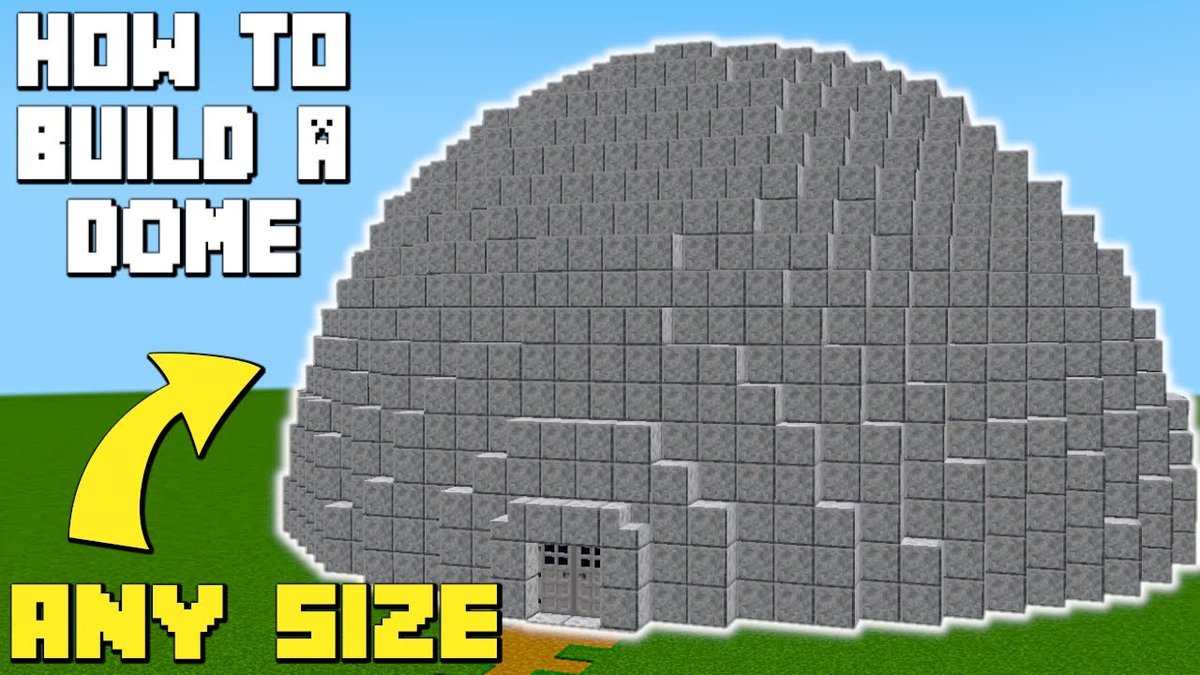
Tired of square bases that feel, well, a little too blocky? Imagine a sleek, secure, and utterly unique dome structure rising from your Minecraft landscape. Whether you're planning an underwater sanctuary, a sky-high observation post, or a sprawling underground metropolis, Minecraft Dome Blueprints & Schematics are your secret weapon for building complex, curved masterpieces without the endless trial-and-error.
This isn't just about building a pretty shell; it's about crafting a functional, awe-inspiring base that stands out from the crowd. Let's dive into how these digital architectural guides can transform your next big build.
At a Glance: Building Better with Dome Schematics
- What are they? Digital files (like
.schemor.schematic) that contain precise block-by-block instructions for a dome structure. - Why use them? Save immense time and effort, achieve perfect curves, ensure material efficiency, and replicate impressive designs.
- Where to find them? Community websites, schematic repositories, and specialized builder forums.
- Key components: Material lists (often extensive!), required mods (for custom blocks), and visual guides.
- How to use them? With in-game mods like Litematica or Schematica, which overlay the blueprint directly into your world.
- Benefits: Elevate your architectural game, create stunning survival bases, or practice intricate designs in creative mode.
Why Embrace the Curve? Beyond the Blocky Basics
For years, Minecraft builders have wrestled with the game's inherent cuboid nature, pushing its limits to create stunning organic shapes. Domes, in particular, represent a pinnacle of this challenge. They offer unparalleled aesthetic appeal, a sense of futuristic design, and practical advantages. A well-designed dome provides expansive interior space without compromising structural integrity, offers excellent protection, and can be easily expanded or modified.
But let's be honest: building a perfectly circular or spherical structure in a block-based game is hard. Calculating each layer, ensuring smooth transitions, and gathering the right materials for a flawless curve can be a monumental task. This is where Minecraft Dome Blueprints & Schematics become invaluable tools, offering a shortcut to architectural grandeur by providing the exact instructions you need.
Decoding Dome Blueprints & Schematics: Your Architectural DNA
When we talk about "blueprints" in the Minecraft context, we're generally referring to two things: visual guides (like pixel art schematics or layered images) or, more commonly, digital .schematic files. These files are essentially the DNA of a build, containing every block's type and position within a specific area.
Think of it like this: if a traditional blueprint shows you where to put walls and doors on paper, a Minecraft schematic tells your game exactly what blocks to place, where, and in what order. This level of detail is a game-changer for complex builds like domes.
Popular platforms like Minecraft Schematics (which, according to our research, hosts nearly 20,000 creations) are treasure troves for these files. You can browse, download, and even share your own designs, transforming complex structures from daunting projects into manageable, step-by-step builds.
What's Inside a Schematic File?
A good schematic isn't just a collection of blocks; it's a meticulously planned build package. Here's what you can expect:
- Block Data: The core of the schematic, specifying every single block type, its variant (e.g., oak planks, stripped oak wood), and its exact XYZ coordinates within the schematic's footprint.
- Material List: A detailed breakdown of every block required, often with precise counts. This is crucial for survival players who need to gather resources. For instance, a "Laboratory Dome Base" schematic found on createmod.com requires a staggering list of materials:
chisel:concrete/white/panel(896)minecraft:cyan_terracotta(3044)minecraft:gray_concrete(4050)minecraft:light_blue_stained_glass(7631)minecraft:smooth_stone(4624)- ...and many more, totaling thousands of blocks across various types. This clearly illustrates the scale and planning involved!
- Dependencies (Mod Requirements): Some schematics utilize blocks from Minecraft mods. If a schematic relies on mods like Chisel, Engineer's Decor, Macaw's Trap doors, Quark, or SimplyLight (as seen in the "Laboratory Dome Base" example), you'll need to have those mods installed in your game client before attempting to load or build the schematic. Without them, the game won't recognize certain blocks, leading to missing textures or an incomplete structure.
- Creator Notes/Instructions: Often, creators include tips, lore, or specific building advice that can be invaluable for replication.
Finding Your Perfect Dome Blueprint: A World of Possibilities
The first step to building your epic dome is finding a design that speaks to you. The variety is immense, ranging from simple geodesic domes to elaborate multi-level structures.
Where to Look for Schematics
- Dedicated Schematic Websites: As mentioned, sites like
minecraft-schematics.comare primary hubs. You can often filter by size, style, or specific block types. - Minecraft Forums & Communities: Reddit (e.g., r/MinecraftBuilds, r/feedthebeast), Planet Minecraft, and various modding communities often have users sharing their creations.
- YouTube Tutorials: Many builders share visual step-by-step guides, sometimes including links to downloadable schematics.
- Creative Mode Exploration: Sometimes, the best blueprint is one you design yourself! Experiment with different block palettes and curves. If you're looking to generate a custom dome rather than download a pre-made one, you might want to Use our Minecraft dome generator to create a unique design tailored to your specifications.
Criteria for Selecting Your Dome
Before you commit to a design, consider these factors:
- Size & Scale: Do you need a small, cozy shelter or a massive, sprawling base? Larger domes demand significantly more resources and build time.
- Aesthetic & Style: Are you aiming for a futuristic glass dome, a rustic stone hemisphere, or something industrial with intricate detailing?
- Material Availability: For survival mode, consider if you have (or can easily gather) the thousands of blocks listed in the schematic's material list. A simple stone dome is far less resource-intensive than one made primarily of rare stained glass.
- Complexity & Modularity: Some domes are standalone structures, while others are designed to be modular, allowing for easy expansion and integration with other parts of a base. The "Laboratory Dome Base" example highlights this modularity, offering flexibility for future additions.
- Mod Dependencies: Are you willing or able to install the necessary mods for a schematic that uses custom blocks? If not, stick to vanilla-friendly designs.
The Building Process: From Digital Plan to Tangible Structure
Once you've chosen and downloaded your schematic file, the real fun begins. The most efficient way to use these files in-game is through client-side mods that act as a visual overlay.
Essential Tools: Schematic Mods
Mods like Litematica and Schematica are indispensable for using blueprints. These mods allow you to:
- Load the Schematic: Import your downloaded
.schemor.schematicfile into your Minecraft world. - View the Overlay: The mod will project a ghost image of the dome onto your world, showing you exactly where each block needs to go, layer by layer.
- Material Tracking: Many schematic mods include features to track the materials you need, sometimes even highlighting missing blocks or incorrect placements.
- Automatic Placement (Creative Only): In creative mode, some versions of these mods allow for automatic placement of the schematic, instantly building the structure for you. This is fantastic for testing designs or quickly adding pre-built elements.
Step-by-Step Construction (Survival Mode Focus)
Building a dome in survival mode with a schematic is a rewarding, albeit resource-intensive, process:
- Gather Your Materials: This is perhaps the most time-consuming part. Go through the schematic's material list meticulously. For a large dome, this could mean quarrying thousands of stone blocks, smelting tons of sand for glass, or farming vast amounts of concrete ingredients. Plan your resource gathering expeditions carefully.
- Choose Your Location: Select a flat, open area or prepare a space for your dome. Make sure there's enough room for its full footprint.
- Load the Schematic In-Game: Use Litematica or Schematica to load your
.schemfile. Position the ghost outline exactly where you want your dome to appear. - Build Layer by Layer: The schematic overlay will guide you. Start with the base layer, placing blocks precisely according to the ghost image. Work your way up, layer by layer, until the dome is complete. Pay close attention to block types, especially for decorative elements or structural supports.
- Troubleshooting:
- Missing Blocks: Double-check your material list and inventory.
- Incorrect Placement: Schematic mods often highlight mis-placed blocks, making it easy to correct errors.
- Mod Conflicts: If using custom blocks, ensure all required mods are correctly installed and compatible.
- Scale Issues: Sometimes a schematic might be bigger or smaller than anticipated. Adjust your plans or find a different schematic if necessary.
Dome Design Principles for the Aspiring Architect
Even with a schematic, understanding basic dome design principles can help you choose the right blueprint and customize it to perfection.
Shape Variations
- Hemispheres: The most common and easiest to build, forming a half-sphere. Great for ground-level bases.
- Full Spheres: More complex, often used for floating structures or encapsulated environments.
- Geodesic Domes: Composed of triangular or hexagonal panels, these are often visually striking and can be surprisingly robust.
- Custom Shapes: Not all "domes" are perfect spheres; some schematics offer more elliptical, elongated, or multi-faceted designs.
Material Choices: Form Meets Function
Your material choice dramatically impacts both the dome's aesthetics and its practicality.
- Glass/Stained Glass: Excellent for natural light, observation decks, and creating a modern, airy feel. Be mindful of mob visibility and potential vulnerability.
- Concrete/Terracotta: Offers a wide range of colors, creating sleek, futuristic, or colorful designs. Very durable and opaque.
- Stone/Stone Bricks: Classic, durable, and readily available in survival. Provides a more rustic or fortified look.
- Quartz: A premium choice for a clean, elegant, and often high-tech appearance.
- Composite Designs: Many of the most impressive domes combine materials – a concrete frame with glass panels, or stone with metallic accents from mods.
Interior Layouts: Making the Curved Space Work
The curved walls of a dome can present unique challenges for interior design.
- Central Pillar/Support: Can anchor the space, house utilities, or serve as a vertical transport system.
- Radial Divisions: Dividing the dome into pie-slice sections can create distinct rooms while maintaining the curved aesthetic.
- Multi-Level Platforms: Utilize the dome's height by adding multiple floors or mezzanines, often supported by internal pillars or floating platforms.
- Lighting: Domes can be dark if not planned well. Incorporate glowstone, sea lanterns, or industrial lights (like those from Engineer's Decor or SimplyLight mentioned in the "Laboratory Dome Base" example) into the structure itself, or use floor/ceiling lighting strategically.
Advanced Dome Crafting: Beyond the Basics
Once you've mastered a basic dome, you might want to explore more complex applications.
Modular Dome Bases
The "Laboratory Dome Base" schematic specifically mentioned its modularity. This concept is powerful: start with a core dome, then add smaller, interconnected domes or corridors as your base expands. This allows for specialized zones (farming dome, crafting dome, living quarters dome) while maintaining a cohesive, organic aesthetic.
Underwater Domes
Building a dome underwater is a popular challenge and creates stunning bases. It requires careful planning for water removal (sponges are your friend!) and often involves materials like glass or prismarine for visibility and style. Schematics can be especially helpful here, guiding you through the intricate process of sealing and clearing the space.
Automated Farms within Domes
Domes can beautifully encapsulate automated farms. A large glass dome provides ample light for crops, while a well-designed interior can house complex redstone contraptions for automated harvesting.
Redstone Integration
Integrating redstone into a dome's curved walls can be tricky, but incredibly rewarding. Think hidden doors, automated lighting, advanced security systems, or even launchpads. Plan your redstone pathways carefully, perhaps using floor channels or false walls to conceal the wiring.
Curating Your Collection: Best Practices for Schematics
Downloading dozens of schematics can quickly lead to disorganization. Treat your schematic files like valuable architectural plans.
- Create a Dedicated Folder: Keep all your
.schemand.schematicfiles in one easily accessible folder, perhaps organized by type (e.g., "Domes," "Houses," "Farms"). - Rename Clearly: The default download name might be cryptic. Rename files to something descriptive, like "Glass_Observatory_Dome_Large" or "Modular_Science_Dome_V2."
- Backup Your Favorites: If you find a schematic you truly love or plan to use frequently, back it up. Digital files can get lost or corrupted.
- Share Your Creations: If you modify a schematic or design an impressive dome yourself, consider giving back to the community by uploading your own schematics to sites like
minecraft-schematics.com.
Your Next Epic Project: Embarking on Dome Domination
Building with Minecraft Dome Blueprints & Schematics is more than just following instructions; it's an opportunity to learn advanced building techniques, expand your material palette, and create truly iconic structures in your world. The satisfaction of seeing a complex, curved masterpiece materialize block by block is unparalleled.
So, download a schematic, gather your resources, and start building. Your next epic base is waiting to take shape, perfectly curved and utterly unique.